Works with every call app on your Mac
Lola Notes records from your Mac, not from inside the meeting. It captures your screen, your mic and the call's audio, so the app you call from doesn't matter. No bot joins, so tell people you're recording.
The same in every app
Whatever you call from, you get the same things:
- One click in the menu bar, ⌥⌘R, or the Control Center button to start.
- A live transcript and optional captions on glass over the call, made on your Mac.
- "What did I miss?" and questions about the call while it's happening, seen only by you.
- Notes that start with your to-dos, written by AI, each with one next move.
- Slides and shared screens read, so search finds what was shown.
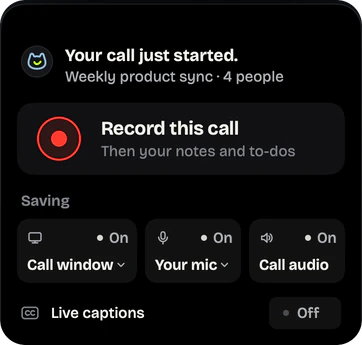
When a call starts, Lola Notes offers to record and picks the call window for the screen: the Zoom or Teams window with the call in it. You can choose a screen, another window or No screen instead. If it doesn't offer, click the cat in the menu bar.
Zoom
Lola Notes records the Zoom app's sound, your mic and your screen. It records on your Mac, not through Zoom's Record button, so Zoom shows no recording notice. Tell people yourself, and if the host says no, don't record.
Zoom's own recording
Zoom can record to your computer, but a participant needs the host to allow it. The host opens Participants, clicks More next to your name, then Allow Record. Everyone then sees Zoom's recording notice.
How to record a Zoom meeting on Mac when you're not the host
Google Meet
Meet runs in your browser. Lola Notes records the browser's sound, your mic and your screen, so you get the call, the slides and your notes. Start it from the menu bar when the call begins.
Google Meet's own recording
Meet's own recording needs an eligible Google Workspace or Google One plan. You can use it if you're the host or a co-host, or you're in the host's organization and Host Management is off. Recordings go to the organizer's Google Drive, and people in the call are told.
Microsoft Teams
Lola Notes records the Teams app's sound, your mic and your screen. It works the same in meetings and calls. Teams shows no recording notice for it, so tell people you're recording.
Microsoft Teams's own recording
Teams can record meetings to the cloud, but who can record depends on your license, your role and your IT admin's settings. Guests and people from other organizations can't start a meeting recording. Microsoft's recording guide has the details.
Slack huddles
Lola Notes records the huddle's sound, your mic and your screen. You keep the audio, a transcript with speakers separated, and notes that start with your next steps.
Slack huddles's own recording
On paid plans, Slack can take AI notes in a huddle: topics, action items and the transcript, in a canvas in the huddle thread. Everyone is told when notes start. AI notes don't work in huddles with external people or guests.
FaceTime
Lola Notes records FaceTime audio and video calls, including group calls: everyone's voices, plus the screen. Start it from the menu bar or press ⌥⌘R when the call begins.
FaceTime's own recording
FaceTime can record an audio call with one other person. Both of you hear a notice, and the recording and transcript go to a Call Recordings folder in Notes. Video and group calls aren't covered.
Webex
Lola Notes records the Webex app's sound, your mic and your screen, the same way it records any call. You get the transcript, the slides that were shown, and your next steps. We have tested Webex less than Zoom, Meet and Teams so far: if something doesn't work as described, write to us.
Webex's own recording
Webex has its own recording. Whether you can use it depends on your role and your organization's settings. If the official recording must live in Webex, ask the host. For your own notes, Lola Notes records on your Mac.
Phone calls
When your iPhone calls ring through on your Mac, Lola Notes records them like any other call: your mic and the other person's voice. Notes and next steps follow, the same as a video call.
Phone calls's own recording
The Phone app on Mac can record calls too. Both people hear a notice, and the recording and transcript go to a Call Recordings folder in Notes. It's only available in some languages and regions.
Tell people you're recording
No bot joins the call, so nobody gets an automatic notice. Say it at the start, or paste a line in the chat. Some places require everyone's consent. How to ask, with messages you can paste.
Not sure which tool fits? See how Lola Notes compares with Granola, Otter and Apple's call recording. What it costs: Free and Pro plans.
Get early access
Leave your email and we'll tell you when you can try Lola Notes. The Free plan needs no card.