How to record a FaceTime call on a Mac, with audio
For a FaceTime audio call with one other person, use FaceTime's own Call Recording: click More, then Call Recording. Both of you hear a notice, and the recording and transcript go to Notes.
For video or group calls, use an app that records the call's audio, like Lola Notes. QuickTime alone records only your voice.
Option 1: FaceTime Call Recording (one-to-one audio)
FaceTime can record an audio call when you're talking to one other person.
- During the FaceTime audio call, click the More button.
- Click Call Recording. Both of you hear a notice that the call is being recorded.
- To stop, click More, then Stop.
The recording is saved to a Call Recordings folder in the Notes app, with a transcript. With Apple Intelligence, you can get a summary. It's built in and free. It covers audio calls with one other person.
Option 2: Lola Notes, for video and group calls
Lola Notes records FaceTime video and group calls from your Mac: your voice, everyone else's, and the screen. You get a transcript with speakers separated and notes that start with your next steps.
- Start or answer the FaceTime call on your Mac.
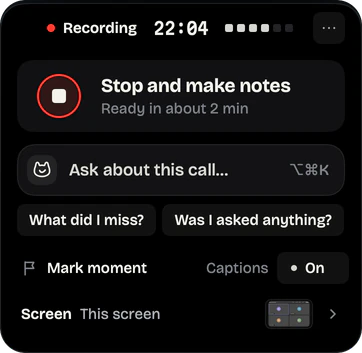
- Click the cat in the menu bar, then Start recording. Pick the FaceTime window, a screen, or No screen. Lola Notes captures your voice, everyone else's and the screen you picked.
- Tell the people on the call before you carry on.
- Hang up, then press Stop and make notes.
Recording phone calls through your Mac
If your iPhone calls come through your Mac, the Phone app can record them. During a call, click More, then Call Recording. Both people hear a notice. The recording goes to the Call Recordings folder in Notes. Apple says it's only available in some languages and regions.
Lola Notes records phone calls through your Mac too, with the same transcript and notes as any other call.
Why QuickTime only records your voice
QuickTime and the Screenshot app record a microphone, not FaceTime's sound. On a FaceTime call that means your voice is clear and the other person is faint, coming through your speakers. With AirPods or other headphones, they aren't recorded at all.
On macOS 27, the Screenshot app's Include System Audio option fixes that. For a one-to-one audio call, FaceTime's own Call Recording (option 1) is simpler. More on screen recording with internal audio.
Tell the other person
FaceTime's own recording plays a notice to both people. Lola Notes doesn't, so say it yourself: "Mind if I record this so I don't miss anything?" More ways to ask.
Questions
Does FaceTime tell the other person when I record?
With FaceTime's own Call Recording, yes: both people hear a notice. Recording with another app on your Mac sends no notice, so tell them.
Can I record a FaceTime video call with sound?
Yes. Use an app that captures the call's audio, like Lola Notes, or the Screenshot app with Include System Audio on macOS 27. Only Lola Notes adds a transcript and notes.
Where do FaceTime call recordings go?
FaceTime's own recordings go to the Call Recordings folder in Notes. Lola Notes's stay in its library on your Mac.
Sources
Checked on 1 Oct 2026. Products change, so follow the links for the current details.
- Apple Support: Use FaceTime audio call features on Mac
- Apple Support: While on a call in the Phone app on Mac
- Apple Support: How to record the screen on Mac
Related
Get early access
Leave your email and we'll tell you when you can try Lola Notes. The Free plan needs no card.