What stays on your Mac, and what doesn't
Lola Notes does on-device meeting transcription, and stores your recordings, transcripts and notes on your Mac. To write AI notes and answers, it sends only text, through Lola Notes's server to our AI provider, Anthropic. Our server doesn't keep it. Audio and video never leave your Mac.
On your Mac
- Screen video
- Audio
- Live transcript
- Final transcript and speakers
- Text read from slides
- Notes
- Search
- Voice prints, only with Learn voices on
- Small jobs by Apple Intelligence, when it's on
In the app's folder in ~/Library/Application Support
Lola Notes's server
- Transcript text
- Screen text
- Your notes and marks
- Meeting title and attendees
- Your first name
- Your questions
- Excerpts from other calls, when you ask across them
Passes this text on. Doesn't store it.
Anthropic (AI provider)
Writes your notes and answers.
No training on it. Deleted within 30 days, except flagged content.
Never sent: audio and video.
What stays on your Mac?
Everything Lola Notes records and makes is stored on your Mac, in the app's folder in ~/Library/Application Support. That includes the screen video, the audio, both transcripts, the notes, your marks and your own notes. Your meetings are files on your own Mac, not on our server.
What is sent for AI notes?
Our AI provider, Anthropic, writes your notes, answers your questions and sums up what you missed. For that, Lola Notes sends text over an encrypted connection to Lola Notes's server, which passes it on to Anthropic:
- Transcript text
- Text read from the screen
- Your typed notes and marked moments
- The meeting's title, date and length
- Attendee names, if Calendar is on
- Your first name
- Your questions, and the chat so far
- For a question across calls: matching excerpts from your other calls, and a short list of their titles, dates, to-dos, people and talk time
That's all text. No audio, no video and no screen images: slides are read on your Mac, and only the words are sent. Your email address isn't sent to Anthropic: our server labels each request with a one-way code for your account instead.
Anthropic doesn't train its models on it. It deletes it within 30 days, except content flagged for a safety review, which it can keep for up to 2 years. That isn't zero data retention, and we don't claim it is. Anthropic's Privacy Center explains its training policy and how long it keeps data.
Asking during a call sends the recent caption lines, which are transcript text. A question across calls also sends matching excerpts from your other calls. If it asks about the calls themselves, like how many or who spoke most, a short list counted on your Mac goes with it: meeting titles, dates, to-dos, people and talk time.
When Let Ask search the web is on (Settings › Notes & Ask) and a question needs it, our AI provider searches the web with words it writes from your question. Only those words leave, never the recording. It is told never to put private details from your calls, like people's names or numbers, into a search. Turn it off any time.
What happens only on your Mac?
Some smart parts can run on your Mac, so they don't reach our server or our AI provider:
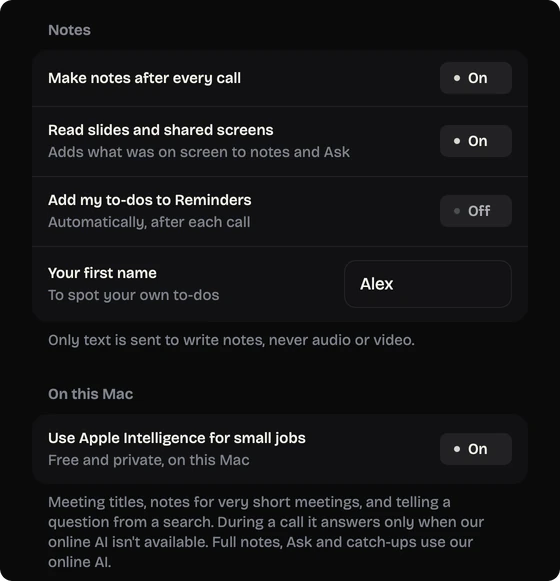
- Small jobs by Apple Intelligence. When Apple Intelligence is on and available on your Mac, meeting titles, notes for very short meetings and telling a question from a search run on your Mac. If you turn it off, or your Mac can't run it, these go to our online AI like your other notes.
- Some answers. Questions like how many calls you had, or on which day, can be answered on your Mac with no AI request.
- Finding a free time. "Block 45 min" looks at your calendar on your Mac.
- Voices, only if you ask. Learn voices is off until you turn it on, and then only for people who agreed in writing. Voice prints stay on your Mac, are left out of backups, and are deleted when you turn it off or choose Forget all voices.
- Private apps stay out of the video. Hide private apps keeps apps like Passwords, Keychain Access and 1Password out of the screen recording, and you can add any app.
- People's pictures from calls. Profile pictures (and, only if you turn it on, a still from video) are read from the call window on your Mac, kept only on this Mac, left out of backups, sync and exports, and removed with Remove or Forget all pictures.
What does Lola Notes's server keep?
Not your meetings. The server passes text through and doesn't store it: no transcripts, screen text, notes, questions or AI replies, and none of it goes into its logs. It keeps only what it needs to run your account:
- Your email address, so you can sign in.
- Your signed-in devices: the device's name, the app version and dates.
- Usage counts: which feature, which model, how much text, minutes of notes, how many web searches, and when.
- Your plan, and your subscription status from Stripe.
- Two one-time app counts: when the app was first opened and when it first recorded, with a random install ID and the versions. What they send.
Usage details are kept for 13 months, then only anonymous totals remain. How long each thing is kept.
Your account and payments
You sign in with your email and a 6-digit code. There's no password. If you upgrade to Pro, you pay through Stripe in your browser, so Lola Notes never sees your card number. In the app you can download your account data or delete your account at any time.
What is never sent?
Audio and video. Lola Notes never uploads the sound of your call or the recording of your screen, to our server, to Anthropic or to anyone else. Transcription is done on your Mac, so the audio has no reason to leave.
Where does transcription happen? On your Mac
On your Mac, in two passes. During the call, Apple's on-device speech engine makes the live transcript and captions. After the call, NVIDIA's Parakeet model, run on your Mac through FluidAudio, makes the final transcript and separates speakers. Slides and shared screens are read on your Mac too.
| Part | Made where | Leaves your Mac? |
|---|---|---|
| Screen video | Recorded on your Mac | Never |
| Call audio and your mic | Recorded on your Mac | Never |
| Live transcript and captions | On your Mac (Apple speech engine) | As text, for notes, "What did I miss?" and answers |
| Final transcript and speakers | On your Mac (Parakeet via FluidAudio) | As text, for notes and answers |
| Text from slides and screens | Read on your Mac | As text, for notes and answers |
| Your notes, marks and questions | Typed or tapped on your Mac | As text, for notes and answers |
| Meeting title, attendees, your first name | On your Mac (attendees from Calendar, if on) | Sent as text with each request |
| Voice prints (Learn voices, off unless you turn it on) | On your Mac | Never |
| Notes and answers | Written by our AI provider (Anthropic), through Lola Notes's server | Not kept on Lola Notes's server. Anthropic's retention applies. Your copy is stored on your Mac |
Everything marked "as text" goes through Lola Notes's server to Anthropic, and only when you use AI notes, "What did I miss?", questions, or a to-do's message draft.
A to-do's message draft, on Pro or with your own AI key, sends only the to-do, why it matters, the call's title and day, the first names of the people it goes to, and the name you sign with. On the free plan, Lola Notes writes the draft on your Mac and sends nothing.
Can old screen video delete itself?
Yes. Screen video takes the most space, so you can have Lola Notes delete it after a number of days you choose. Your transcripts and notes stay.
Does it need the internet?
AI notes, "What did I miss?" and answers need an internet connection and a sign-in, because they're written by AI online.
What about the people you record?
No bot joins the call, so nobody gets an automatic notice from Lola Notes. That makes it your job to tell them. Recording laws differ by place, and some need everyone's consent. Read how to tell people, with messages you can paste.
What does this website collect?
This website sets no cookies and runs no analytics. Fonts are served from this site, not from a font service. If you join early access, your email goes to our waitlist provider, Cloudflare, Inc. (our website host).
The full details, for the app, the service and this website, are in our privacy policy.
Next: how Lola Notes works, plans and pricing, or bot-free vs on-device notes, explained.
Get early access
Leave your email and we'll tell you when you can try Lola Notes. The Free plan needs no card.