How to record a Google Meet call on a Mac
If your Google plan includes recording and you're allowed to record, use Meet's own recording. It goes to the organizer's Google Drive, and people in the call are told.
Otherwise, record from your Mac with an app that captures the browser's sound, like Lola Notes. Then tell people you're recording.
Option 1: Meet's own recording
Meet can record, but only in some cases. You need all of these:
- An eligible plan: certain paid Google Workspace editions, or a Google One plan with 2 TB or more.
- Recording turned on for your account by your Workspace admin.
- Permission in the meeting: you're the host or a co-host, or you're in the host's organization and Host Management is off.
- A host who can record too. Google says you can't record if the host doesn't have permission.
- A computer (or an Android device), not an iPhone.
The recording is saved to the meeting organizer's Google Drive, and people in the call are told it's being recorded. Google's page lists the exact plans.
Option 2: Lola Notes (Meet in your browser)
Meet runs in your browser. Lola Notes records your browser's sound, your mic and your screen from your Mac, whatever your Google plan. You get the transcript, the slides that were shown, and notes that start with your next steps.
- Open the Meet call in your browser. Then click the cat in the menu bar and press Start recording, or press ⌥⌘R. Lola Notes asks what to record on screen: the browser window with the call, this screen, or No screen.
- Post a line in the Meet chat so everyone knows you're recording.
- Present or watch slides as usual. Text on the screen is read into your notes.
- Press Stop and make notes when you leave the call. Your next steps sit at the top.
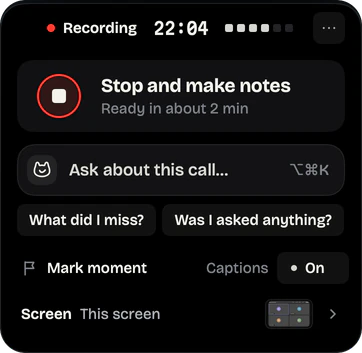
Lost the thread? Ask about the call while it's happening, with ⌥⌘K. Only you see the answer.
Option 3: free, by recording the browser window
Meet lives in a browser tab, so you can screen record that window. Press ⇧⌘5 and pick Record Selected Window, then click the browser. On macOS 26 that records your mic, not the tab's sound. On macOS 27, turn on Include System Audio under Options before you start.
The result is a video on your desktop. It has no transcript, and no copy goes to Drive. How screen recording with internal audio works on a Mac.
Tell people you're recording
Meet tells people when its own recording starts. A recording made on your Mac doesn't, so post a line in the Meet chat: "Recording this for my notes. Let me know if you'd rather I didn't." More ways to ask.
Questions
Can I record Google Meet if I'm not the host?
With Meet's recorder, yes if you're a co-host, or you're in the host's organization and Host Management is off. Your plan must include recording. Recording from your Mac works as a participant. Tell people first.
Where do Google Meet recordings go?
Meet's own recordings go to the organizer's Google Drive. Lola Notes's recordings stay on your Mac.
Sources
Checked on 1 Oct 2026. Products change, so follow the links for the current details.
Related
Get early access
Leave your email and we'll tell you when you can try Lola Notes. The Free plan needs no card.