How to record a Zoom meeting on a Mac when you're not the host
Ask the host to let you record. Then Zoom's own Record button works, and everyone sees Zoom's recording notice.
If the host says no, don't record. If they just can't change the setting now, ask everyone out loud. Then a Mac app that captures your screen, your mic and Zoom's sound can record as a participant.
Option 1: ask the host to allow recording
In Zoom, a participant can record to their computer only if the host allows it. The host does this during the meeting:
- The host clicks Participants.
- Next to your name, the host clicks More, then Allow Record. You get a notification.
- You click Record in Zoom's controls. Everyone sees Zoom's recording notice.
Hosts can also let people ask for permission to record from Zoom's settings. Zoom saves the recording on your computer.
Option 2: record from your Mac with Lola Notes
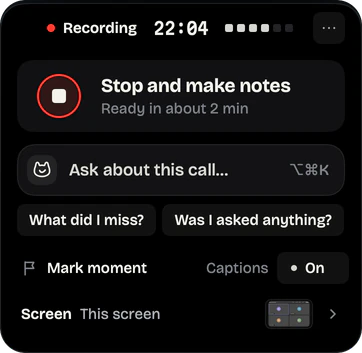
Lola Notes records on your Mac instead of through Zoom's Record button. It captures your screen, your mic and the sound coming out of Zoom. You get a transcript with speakers separated, the slides that were shared, and notes that start with your next steps.
- Join the Zoom meeting. When Lola Notes notices the call, it offers to record. Tap Record this call. It records the Zoom window, your mic and Zoom's sound. You can pick a screen, or No screen, instead.
- Before anything important, say you're recording, or post it in Zoom's chat.
- If someone shares slides, leave them on screen. Lola Notes reads them into your notes.
- When the meeting ends, Lola Notes stops by itself and makes your notes. You get a few seconds to keep recording, or press Stop and make notes any time.
Option 3: free, with the Screenshot app
You can screen record the Zoom window itself. Press ⇧⌘5 and choose Record Selected Window. Whether Zoom's sound is in the file depends on your macOS:
- On macOS 26, it records your mic. Other people are faint, or silent if you wear headphones.
- On macOS 27, open Options and turn on Include System Audio first.
You get a video of the meeting. There's no transcript and no notes. Screen recording with internal audio, step by step.
Will other people know?
Zoom shows its recording notice when Zoom itself records. A recording made on your Mac, by Lola Notes or the Screenshot app, shows nothing in Zoom. So the only notice is the one you give. Say it at the start, or paste a line in the Zoom chat.
Tell people you're recording
No bot joins the call, so nobody gets an automatic notice. Say it at the start, or paste a line in the chat. Some places require everyone's consent. How to ask, with messages you can paste.
If it isn't working
"Record" is grayed out in Zoom
The host hasn't allowed you to record, or your account's settings turn local recording off. Ask the host. If they say no, don't record.
The recording only has your voice
A plain screen recording used the microphone only. Use an app that captures Zoom's audio, or Include System Audio on macOS 27.
Questions
Can Zoom tell if I record with another app?
Zoom's notice appears when Zoom records. Don't rely on whether any app can tell. Say you're recording; it's the honest move, and in some places it's the law.
Can I record a Zoom meeting on a Mac for free?
Yes, if the host allows Zoom's own recording. On macOS 27 you can also use the Screenshot app with Include System Audio. Neither gives you a transcript or notes.
Sources
Checked on 1 Oct 2026. Products change, so follow the links for the current details.
- Zoom Support: Enabling or disabling computer recording
- Zoom Support: Starting a computer recording
- Apple Support: How to record the screen on Mac
Related
Get early access
Leave your email and we'll tell you when you can try Lola Notes. The Free plan needs no card.